Sphinx配置
建立项目
注意文件层次,对后面有影响

注释格式
"""Ex01.

    Args:
        a(int):***
        b(int):***
    Returns:
        float:***
    Examples:
        >>> c = my_add(1,2)
            c = 1 2
                3 4
"""

- 描述与Args需要一个空行
- Args Returns都可以没有
- Returns下一行可以写None
使用Sphinx生成文档
安装Sphinx
pip install sphinx -i https://pypi.tuna.tsinghua.edu.cn/simple
pip install sphinx_rtd_theme -i https://pypi.tuna.tsinghua.edu.cn/simple
pip install --upgrade recommonmark -i https://pypi.tuna.tsinghua.edu.cn/simple
pip install jieba -i https://pypi.tuna.tsinghua.edu.cn/simple
生成文档
01 打开cmd,切换到上述doc的路径,cd /d D:\test_Sphin\doc
02 在cmd中,输入sphinx-quickstart
Separate source and build directories (y/n) [n]: y
一直回车即可
03 复制替换D:\test_Sphin\doc\conf.py
# -- Project information -----------------------------------------------------
project = 'test_Sphinx'
copyright = '2022, xdd2026@qq.com'
author = 'xdd2026@qq.com'
release = '1.0'

# -- General configuration ---------------------------------------------------
import os
import sys
sys.path.insert(0, os.path.abspath(r'D:\test_Sphin\src\demo'))

extensions = [
    'sphinx.ext.autodoc',
    'sphinx.ext.napoleon',
    'sphinx.ext.viewcode',
    'recommonmark'
]
templates_path = ['_templates']
language = 'zh_CN'
exclude_patterns = ['_build', 'Thumbs.db', '.DS_Store']
html_theme = 'sphinx_rtd_theme'
html_static_path = ['_static']
04 在文件index.rst文件加入modules或modules.rst
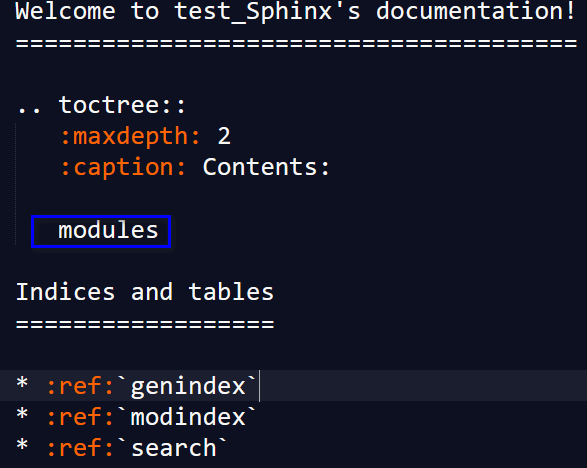
05 在cmd (doc目录中),依次输入下面代码,用来从py文件中提取内容、生成html文件
注意:-o 后面跟的是保存rst文件的路径, 你的index.rst在哪个目录,那你就指定哪个目录。然后在后面的是你的项目(代码)路径
sphinx-apidoc -o source ../src/demo -f
make clean & make html
06 双击打开 \doc\build\html\index.html
07 以后添加py文件或者修改注释,只需
sphinx-apidoc -o source ../src/ -f
make clean & make html
报错解决方法
WARNING: autodoc: failed to import module 'file01'; the following exception was raised:
确认index.rst 文件中含有 modules
修改conf.py文件中的路径,不清楚相对路径时,可写绝对路径。Sphinx只会提取该路径下py文件的注释。


Sphinx的一些理解

文档组成
文档包括两部分,代码文档与后期文档。代码文档来自py文件中的注释,后期文档可来自md文件、rst文件与ipynb文件等
sphinx-apidoc -o source ../src/demo -f命令将demo文件夹中的.py文件中的注释生成文档,存放在doc/source文件夹下index.rst是网页入口文件,上图中index.rst文件里面有两部分,
第一部分是加载doc/source/markdown/sphinx_install.md文件,只显示文件中最高的一级标题
第二部分是加载doc/source/modules.rst文件,这是代码生成的文档入口,保留两个层级
关于路径
conf.py 文件中的路径的根目录是source,也就是conf.py的路径,可使用绝对路径
index.rst文件中的路径的根目录是source,也就是index.rst的路径,不可使用绝对路径
成品
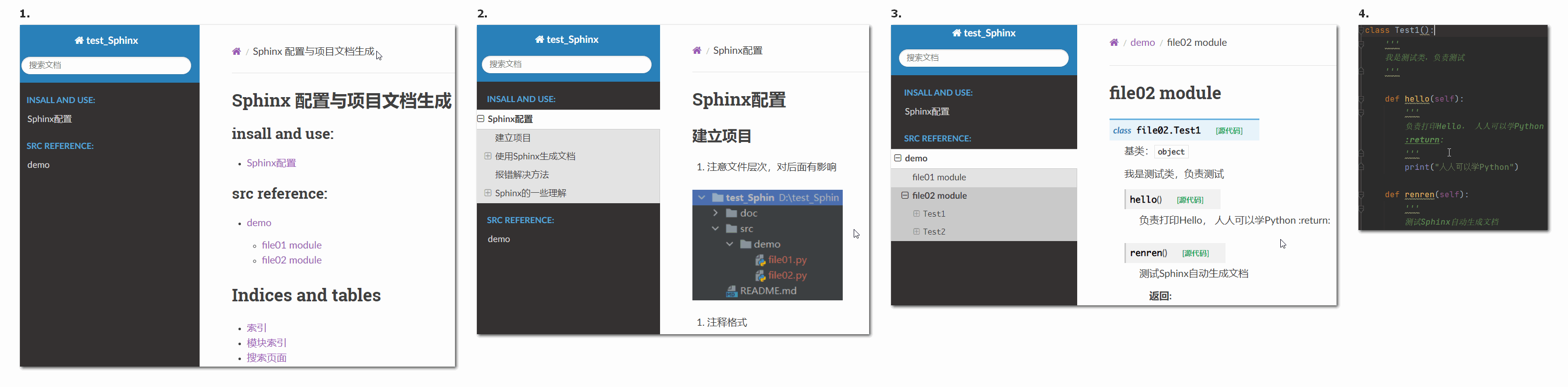 image-20221104193232710